Are you looking for the top home care smartphone apps to help your organisation simplify your care planning and reporting? We’ve got you covered.
Care apps can make life easier for your team – and give you extra peace of mind.
They let carers see rotas, check care plans, and write up their daily notes on the go. They usually let you track care visits in real time, so you can be sure that your clients are being supported. Some care apps also help carers share updates with a client’s trusted family and friends.
In this guide, we’ll explain what you should look for when you’re deciding on a digital care solution. We’ll list our top home care smartphone apps, and share some tips on how to set your team up for success with your chosen app.
Quick check: which home care app fits your service?
Pick what matters most to your team and we’ll shortlist the apps in this article that match, using each one’s published features. Your choices stay on this page – nothing is saved or sent anywhere.
Which of these matter to you? Pick as many as you like.
Pick at least one thing that matters to you first.
Table of Contents
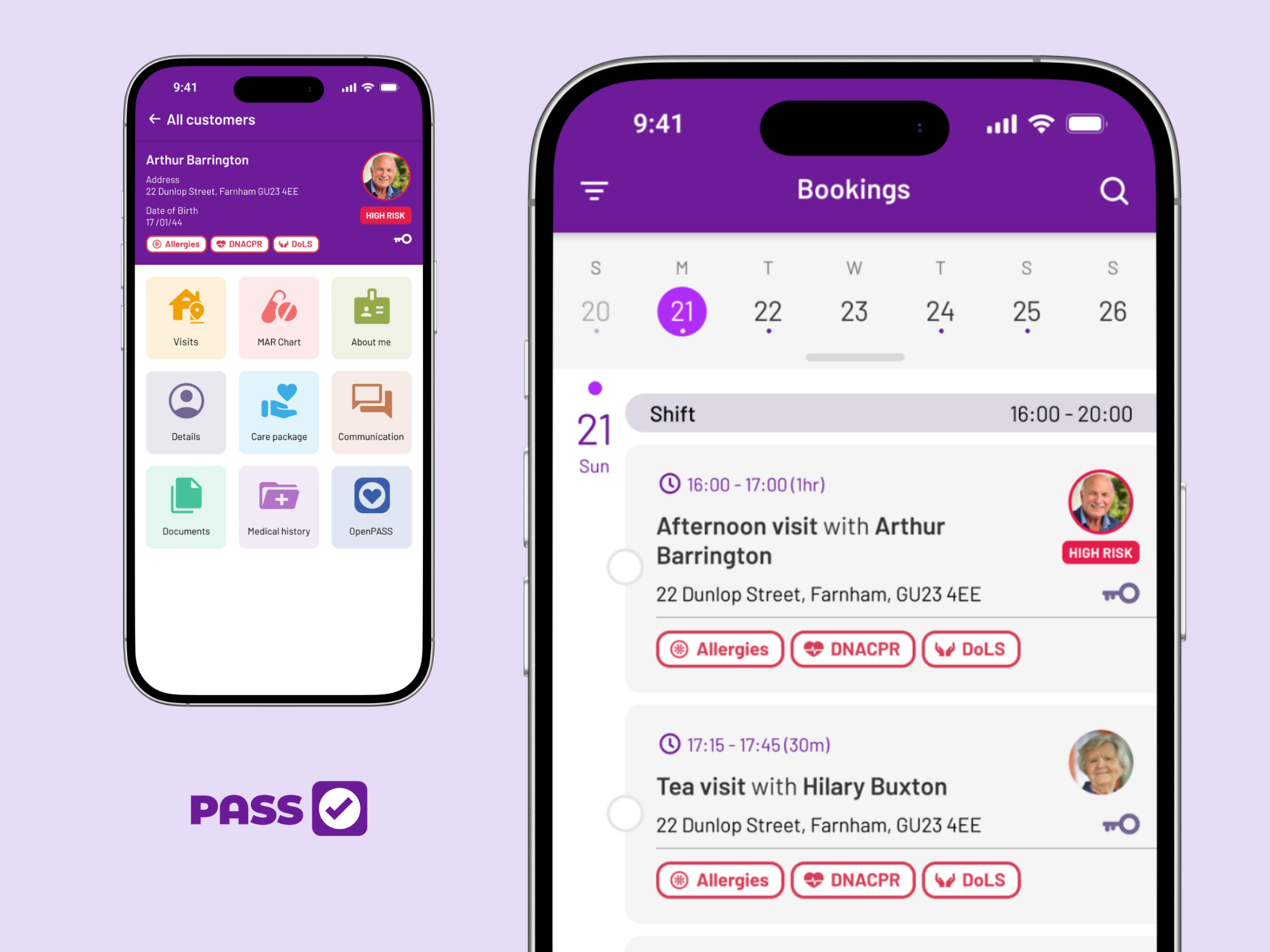
Everything a carer needs for the day: client details and the week’s bookings, side by side
What should I look for in home care apps?
Every care service is different, but most will have similar needs from their home care apps. You’ll probably want a solution that lets you track care visits, record care notes, share rotas, access care plans, and communicate with families.
Just like with all care management and care planning software, you’ll want to prioritise security, and make sure that your chosen home care app provides comprehensive training and customer support.
Let’s look at these features in more detail.
Care notes
Your care app should let your team record care notes during a visit.
Instead of writing daily notes on paper, they can use the care app to record care as they go along – and some apps even let you use voice to text, so you can record your notes as quickly as you can speak.
For many care providers, this is the most important reason to switch to home care software. Care workers often find it easier to record care notes on an app, and digital records are usually more secure, too. Unlike paper records, digital care notes can only be accessed by authorised users, and they’re much harder to lose.
Care planning and medication management
Accessing care plans, risk assessments, and medication records is a crucial part of a home care app.
Care plans and medication records should always be accessible on a home care app.
During a visit, carers can check risk assessments, complete eMAR forms, and make sure that they’re following the care plan. Additionally, some of the top home care apps can alert carers to potential issues, such as missed tasks or drug interactions – helping them avoid medication errors and ensuring that clients stay safe.
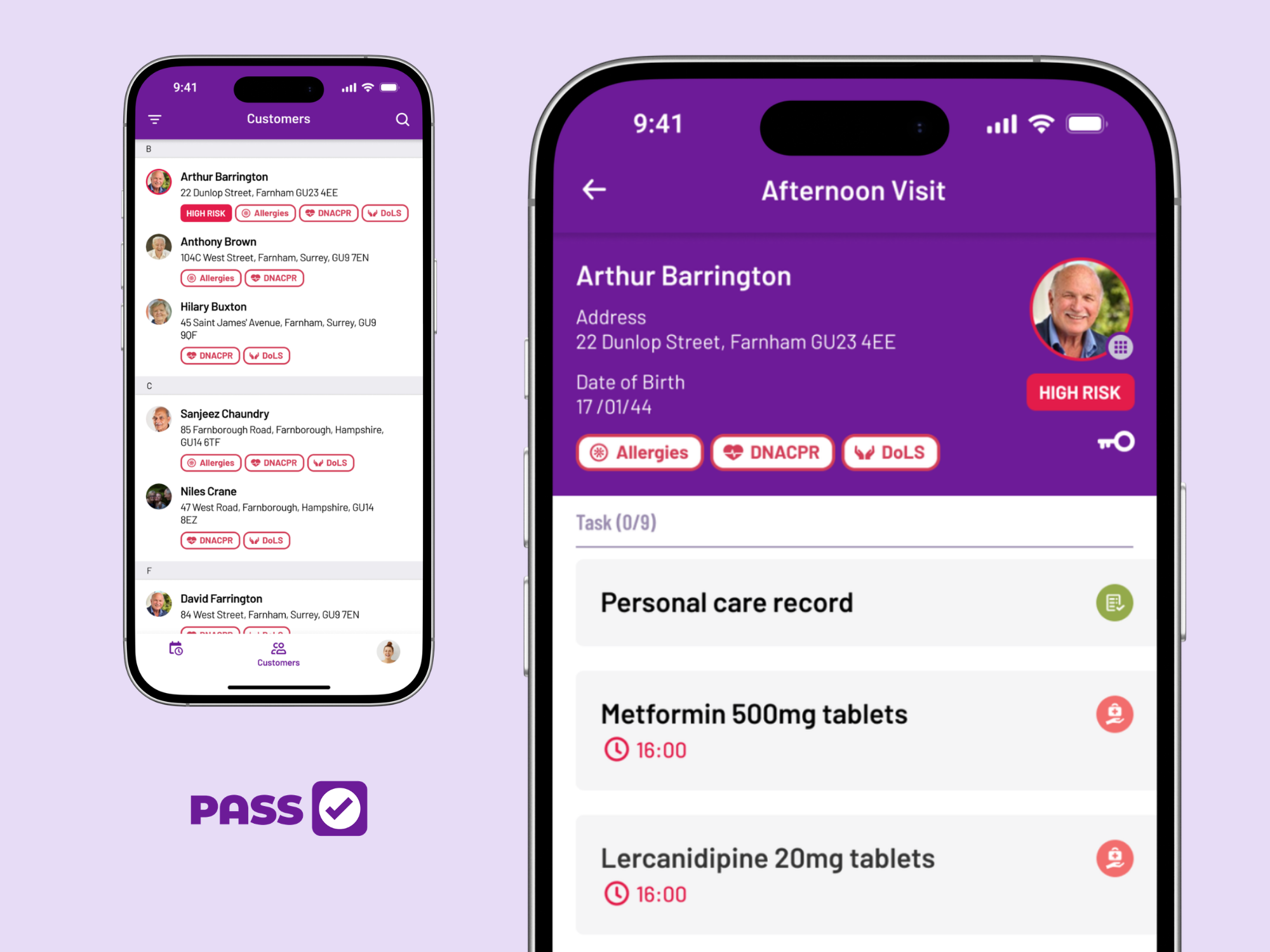
Every medication task listed for the visit, with allergies and risks up front
Rostering
Your home care app should let you share rosters with your team, so they know exactly when they’ll be working.
A good care app should let care workers access the roster. It’s convenient both for carers and care co-ordinators: carers don’t need to visit the care office to check when they’re working, and care co-ordinators can make changes to the roster if necessary, confident in the knowledge that the team will see the latest version.
Is rostering your main priority? Check out our list of the top home care scheduling solutions.
Care visit tracking
Home care apps can help you track care visits – helping you spot problems, evidence visits, and invoice accurately.
Often using QR codes or NFC technology, a good home care app can help you track and monitor care visits in real time. If a visit is late, you’ll be alerted, so you can take action quickly.
Real-time monitoring also provides valuable proof that visits have taken place. Whether you need to use this information for invoicing, reassuring family members, or providing evidence to inspectors, a good home care app can help you.
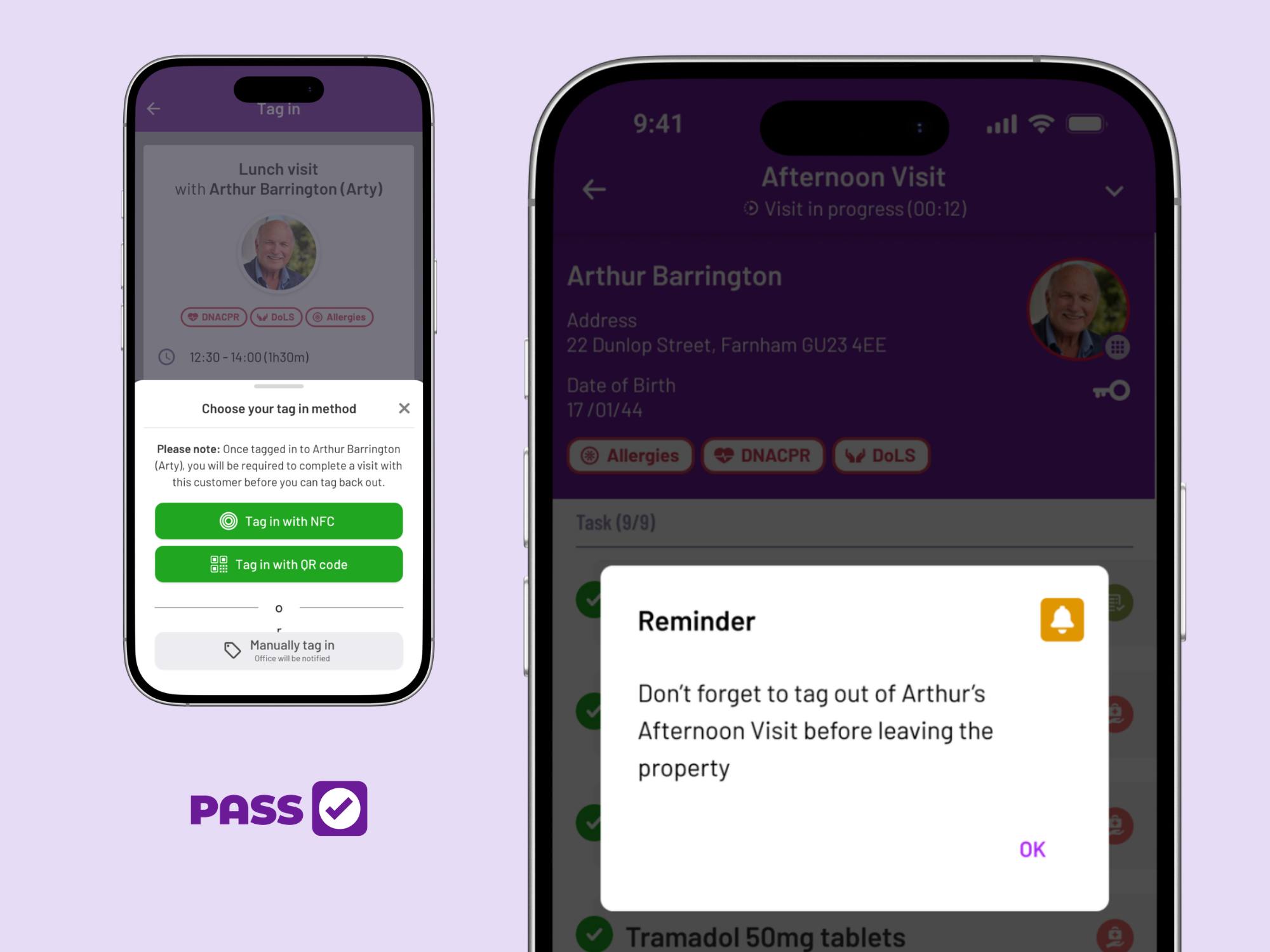
Tag in with NFC or a QR code, and get a reminder to tag out before leaving
An all-in-one solution
Your home care smartphone app should help you with multiple aspects of care management.
Your chosen software needs to help your team access care plans, medication management, and rosters – but the top home care apps are packed with other features too. A good home care management app can help you with a range of tasks, including:
- Creating the most efficient rosters
- Generating accurate invoices
- Running payroll
- Notifying team members when they need training
- Spotting trends in care notes and alerting carers of potential issues with clients
When one app has access to all of your care service’s data, it can help you avoid mistakes – for example, using care visit logs to make sure that invoices and payslips are accurate.
Security
Top home care smartphone apps should prioritise security.
Care plans, medication records, and care notes contain personal and sensitive information about clients. You need to know that this data is being stored securely.
Digital care records are often more secure than paper alternatives. However, it’s important to look into the details. Does the app let you set permissions, so that only appropriate users can access an individual’s records?
Make sure that your chosen app meets all of the UK’s data protection requirements. Check that they do regular penetration testing to make sure that there are no potential security risks, and look for organisations that are ISO 27001 certified – this is a global standard for information security.
Family communication
Home care apps should make it easier to communicate with a client’s trusted family and friends.
As a home care provider, you know that you’re just one part of your client’s support system. Many clients have family members who are involved with their care, and who want to stay up-to-date with what happens during care visits. A good home care app should let you share updates with families.
Look for features like:
- Shared access to daily care notes
- Secure messaging
- Customisable communication levels for different contacts – your client may want some relatives to have access to messages, but not their medication details, for example
Care apps can save time when it comes to communicating with a client’s family and friends. Instead of spending hours on the phone giving updates, care workers know that a client’s loved ones can simply check the app for details about a visit.
Offline mode
No internet access? A good home care app should be able to cope.
Home care apps should have an offline mode. After all, when your team travel to visit clients, you can’t always guarantee that they’ll have internet access – but you need to make sure that they can still use your chosen app.
Care apps should let support workers download a client’s care plan, medication records, and other key details in advance. It doesn’t matter if there’s no internet available at the client’s home – they’ll still have access to the necessary information. In the same way, carers should still be able to make notes and document the care they’re delivering, and know that it will sync when they’re back online.
Even if your team usually have internet access at their clients’ homes, offline working is still a useful feature – we all experience the occasional internet outage, and it’s important to know that you can continue delivering great care in any circumstances.
Training and support
Using new technology can be tricky, so look for a solution that offers comprehensive training and 24-hour customer support.
Even if your team are usually tech-savvy, you want to make sure that your new home care app comes with a training programme as part of the onboarding process. Remember that you may need additional training for new starters, too – check that your chosen solution offers this.
It’s also crucial to make sure that there’s good customer support available. What would you do if you had a problem in the middle of the night, at a weekend, or on a bank holiday? Look for solutions with 24-hour customer support.
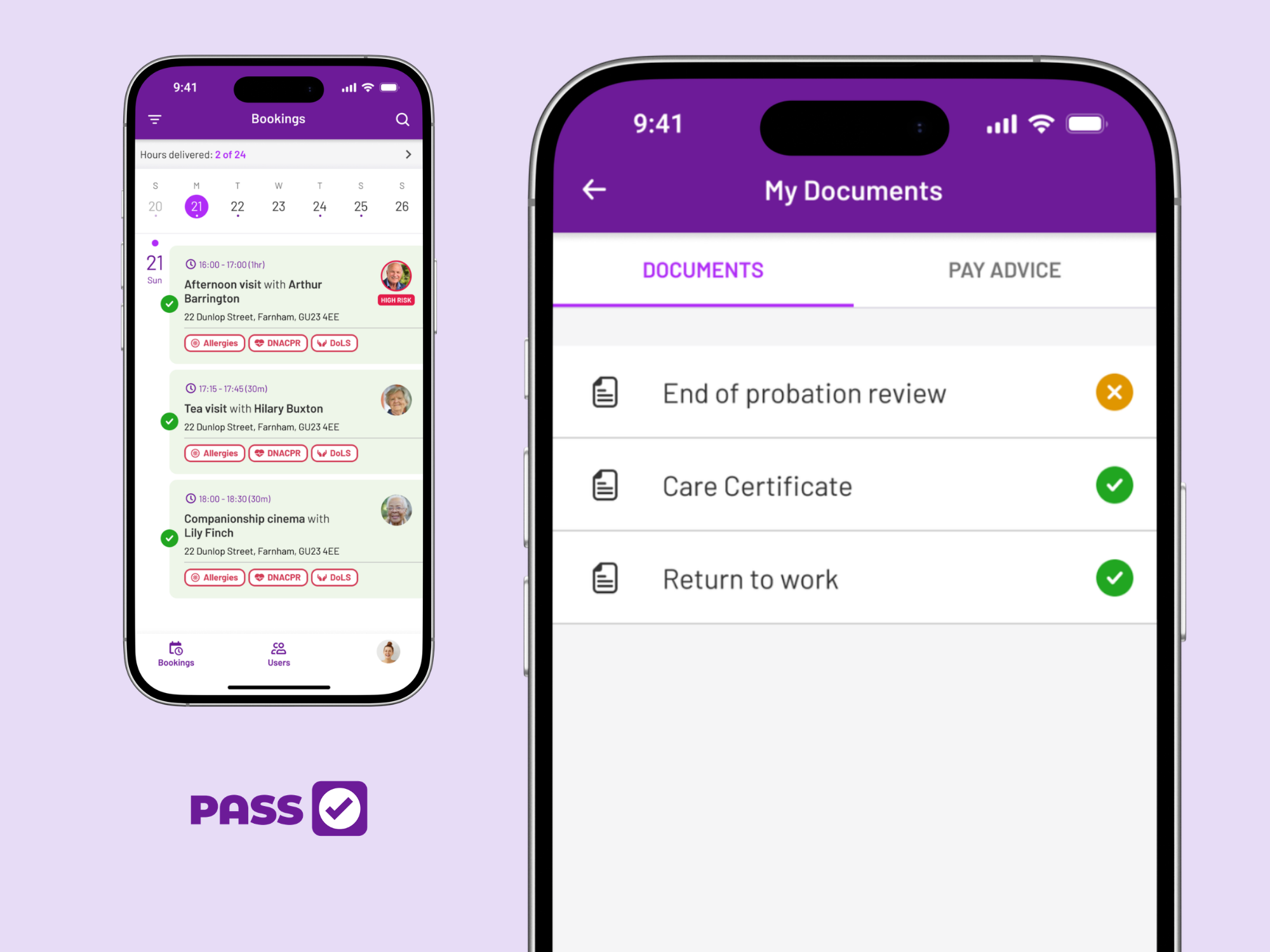
Completed visits tick off in green, and training records live in the same app
Book a free tour
Put PASS in your carers’ pockets
Care plans, eMAR, rotas and family updates in one app, with offline mode and 24/7 support included.
👉 Get started with PASS
Top home care smartphone apps in 2026
If you’re looking for a home care smartphone app in 2026, you might feel a bit overwhelmed. There are so many options out there, and it can be difficult to decide what’s right for your team.
We’ve put together a list of five of the top home care smartphone apps – have a look through our at-a-glance guide, and see which apps we’d recommend.
1. PASS by everyLIFE
PASS by everyLIFE is our top home care smartphone app.
It includes all the features we’ve mentioned above – if you need to monitor care visits, write daily notes (either via typing or voice to text), access care plans, or communicate with family members, PASS has you covered.
You can access the user-friendly app offline, so if your carers travel to remote locations, they can still log their activity. And, if you have any issues, the support team are available 24 hours a day, seven days a week.
Security is also a real priority: the app is protected to ISO 27001 and Cyber Essentials Plus standards, and your data is encrypted. Staff only see what’s relevant to their role, too, so your clients can feel reassured that their personal information will stay private.
At a glance:
- Features: Real-time visit tracking using QR codes and NFC, care note recording (including voice to text), care planning and medication management, access to rosters, family communication features, offline mode, comprehensive training and 24/7 support
- Platforms: Android and iOS
2. CareLineLive
CareLineLive is another all-in-one home care app.
Like most home care apps, it lets care workers log daily notes, access care plans and medication records, and see rosters. It also lets carers communicate with a client’s family, and it’s described as being user-friendly.
It helps you track your care team using GPS, and does have an offline mode, so you can check in and access many features of the app without internet – although you may not be able to download certain documents.
At a glance:
- Features: Care visit tracking using GPS, care note recording, care planning and medication management, access to rosters, family communication features, offline mode, devices available at an extra cost
- Platforms: Android and iOS
3. Nourish Better Care at Home
Nourish Better Care at Home can record care visits, allow team members to access medication records and care plans, and has an offline mode.
The app also helps facilitate family communication, and you’ll get initial training and access to 24/7 live chat support.
Nourish provides a range of apps, which can cover a variety of care management and analytical tasks. Depending on your requirements, you might need to use several of Nourish’s apps to cover all of your needs.
At a glance:
- Features: Care visit tracking, care notes, medication management and care planning, rostering, family communication, offline mode, initial training and 24/7 live chat support available
- Platforms: Android and iOS
4. Log My Care
Log My Care is an all-in-one digital solution that includes visit tracking, voice to text note recording, and an offline mode. Some other key home care app features are available if you choose their Pro option, including family communication, electronic medication records, and rostering.
If you only support a few clients, Log My Care has a “Starter” option. Including fewer features (no rostering, family app, eMAR, care planning, or 24/7 support), this plan can help new or small agencies with task management and logging care.
Even for larger care services, support is provided through live chat and email, with no phone option.
At a glance:
- Features: Care visit tracking using GPS, care note recording (including voice to text), care planning, offline mode, plus medication management, rostering, and family communications available as additional add-ons
- Platforms: Android and iOS
5. OneTouch
OneTouch lets care workers check in, record care notes, access care plans, and communicate with family and friends. It’s an all-in-one system that allows teams to handle invoicing and payroll, medication management, and rostering.
However, it doesn’t have an offline mode, so you’ll need to consider whether your team ever travels to areas without internet access.
At a glance:
- Features: Care notes, care planning and medication management, rostering, family communication
- Platforms: Android and iOS
How to set your team up for success with home care apps
Getting used to new software can be daunting, and your care team might feel apprehensive – especially if they’re not confident with technology. However, there are some things you can do to help ease the transition for them.
- Know what works for your organisation, and choose the right app. Every care service is unique, and will have different priorities. For example, if many of your clients live in remote areas with poor phone signal, prioritise care apps that have an offline mode. If your carers struggle with new technology, make sure that you look for a solution that includes training for the entire team, as well as 24-hour support.
- Make sure that your team members all have an appropriate smartphone. You may need to supply smartphones for your team members if you can’t guarantee that they’ll always have a suitable device available.
- Arrange suitable training for all users. Ideally, your chosen care management software will include training as part of the onboarding process. Make sure that each team member has time to attend a training session – and arrange training for new carers when they start, too.
- Encourage your team to share their concerns. Team members may not want to publicly admit that they’re nervous about using new software – especially to management. You could set up an anonymous mailbox to allow colleagues to share concerns without giving their names. Alternatively, you could nominate one team member to be the “app champion” – this would allow care workers to get support from a peer, without involving a manager.
- Make sure support is available. Users may run into difficulties with new software from time to time. Make sure that you have comprehensive documentation available, and clearly explain to your team how they can contact customer support for assistance.
Ready to get started? The team at PASS are here to talk about your needs!
Book a free tour
Ready to see the app in action?
See how the PASS app guides every visit, records care in seconds, and keeps families in the loop.
👉 Get started with PASS