
If you’re responsible for planning care rotas, you’ll understand the importance of finding the top home care scheduling solutions.
Scheduling can be a time-consuming and complex job – but digital solutions can make it easier.
In this article, we’ll explain how digital care scheduling software can help your care service, and share the top home care scheduling solutions available now. We’ll also tell you what you should look for, so you can make the best decision for your organisation.
Quick check: which scheduling software fits your service?
Pick what matters most to your service and we’ll shortlist the solutions in this article that match, using each one’s published features. Your choices stay on this page – nothing is saved or sent anywhere.
Which of these matter to you? Pick as many as you like.
Pick at least one thing that matters to you first.
Table of Contents
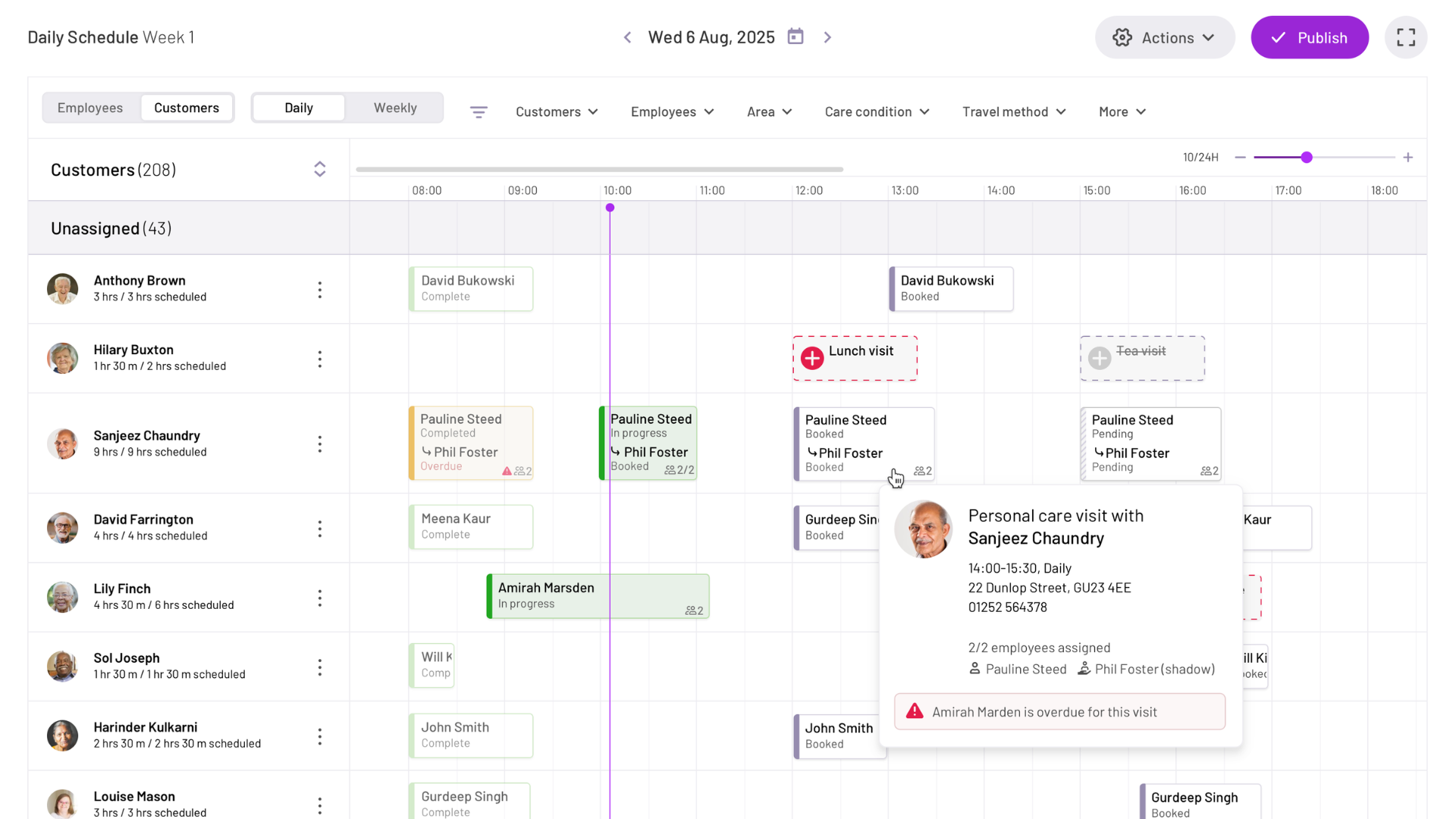
The PASS daily schedule: every carer, visit and gap in one view
Home care schedules: the basics
Home care schedules explain which care worker will support which client, and when.
Creating these schedules (also known as rotas or rosters) can be complicated. Care co-ordinators or managers need to consider travel times, the length of the care visit, client preferences, and carer availability. In some organisations, home care scheduling can be a full-time job.
There are two main options for home care scheduling:
- Written care scheduling: Traditionally, care co-ordinators or managers would work out schedules themselves. They might do it by hand on paper, or use spreadsheets or templates they’ve created themselves. If you’ve worked in care for a while, you’ve probably seen large whiteboards or written schedules taking up entire walls of the care office! Working out care schedules manually can be time-consuming, and it doesn’t always lead to the most efficient solutions.
- Digital care scheduling solutions: Digital home care scheduling solutions are usually much quicker and more efficient than putting together rosters by hand – so it’s no surprise that more care services are choosing care management software to schedule their care. Digital solutions often use AI to optimise care scheduling, saving time for both the care co-ordinator and the care workers. Digital care schedules are usually planned on a computer or tablet, and may automatically sync with a carer’s device.
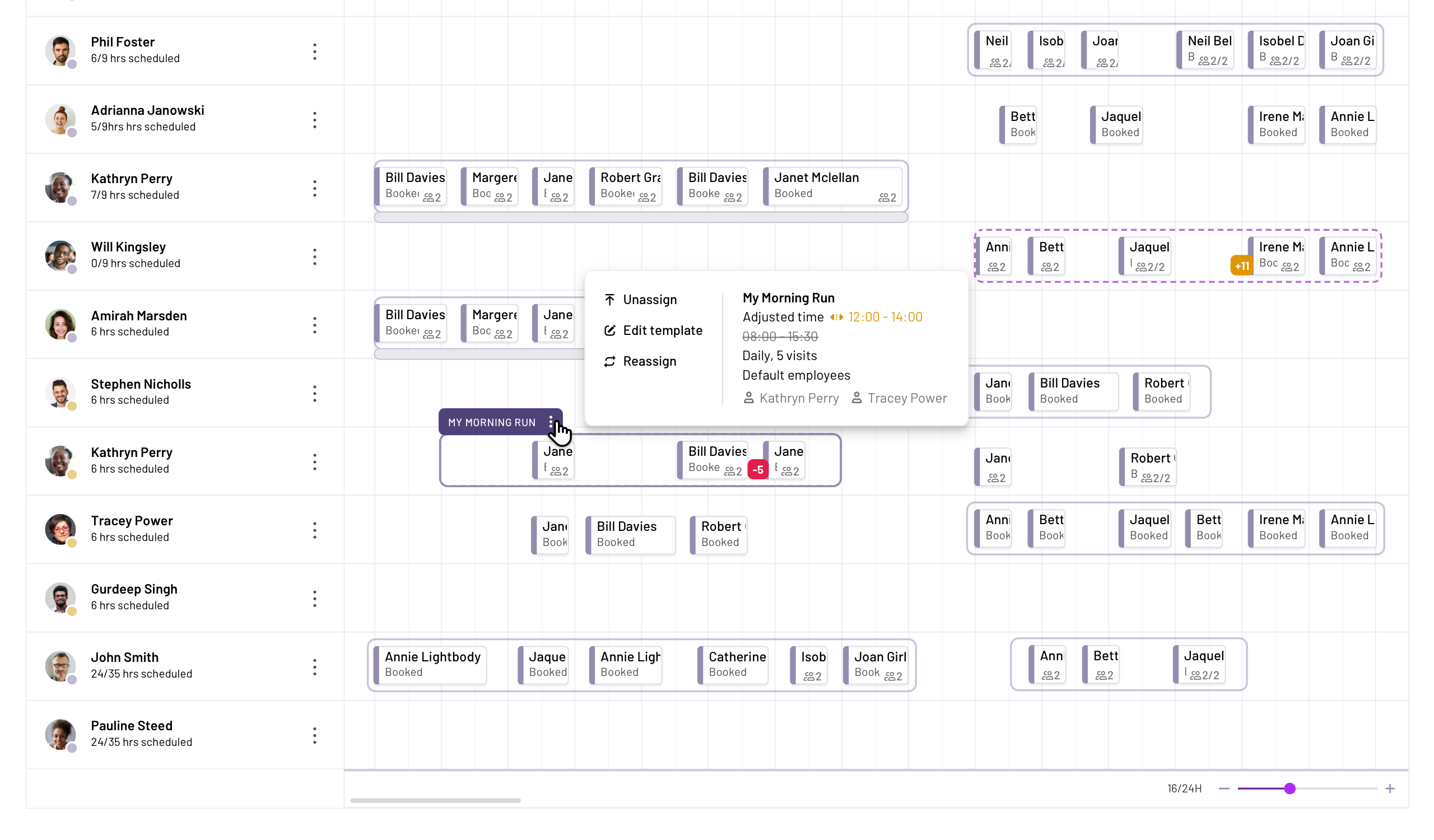
A digital run of work replaces the office whiteboard – every visit planned to the minute
Book a free tour
Plan your week’s rotas in minutes
PASS helps you build efficient schedules, spot wasted travel time, and send every change straight to your carers’ phones.
👉 Get started with PASS
What should I look for in care scheduling software in 2026?
Every care service has different requirements, but in general, you should look for home care scheduling solutions that can help you with care management in general.
Your chosen software should link with your invoicing and finance systems, as well as your care planning and eMAR solutions. You should also look for a service that provides comprehensive training, offers offline access, and has 24-hour customer support.
If you’re new to home care software, or you haven’t looked for a new solution in a while, you should also know that AI optimisation is important in 2026. Smart scheduling services can make your care co-ordinator’s life a lot easier!
Let’s look at these aspects of care scheduling software in more detail.
An all-in-one solution
It’s simplest to look for a care scheduling solution that also includes the rest of your digital care management needs.
Most care services use digital care planning software, eMAR systems, and reporting features these days – and it’s no surprise, as they’re usually more secure and quicker than the traditional paper alternatives.
To simplify your care planning, scheduling and reporting, you should look for software that includes all of these features, rather than using multiple apps. It’s quicker and easier to learn how to use one app, and you’ll have all of your data in one place – making it simpler to create reports, look for patterns and trends, and train new starters.
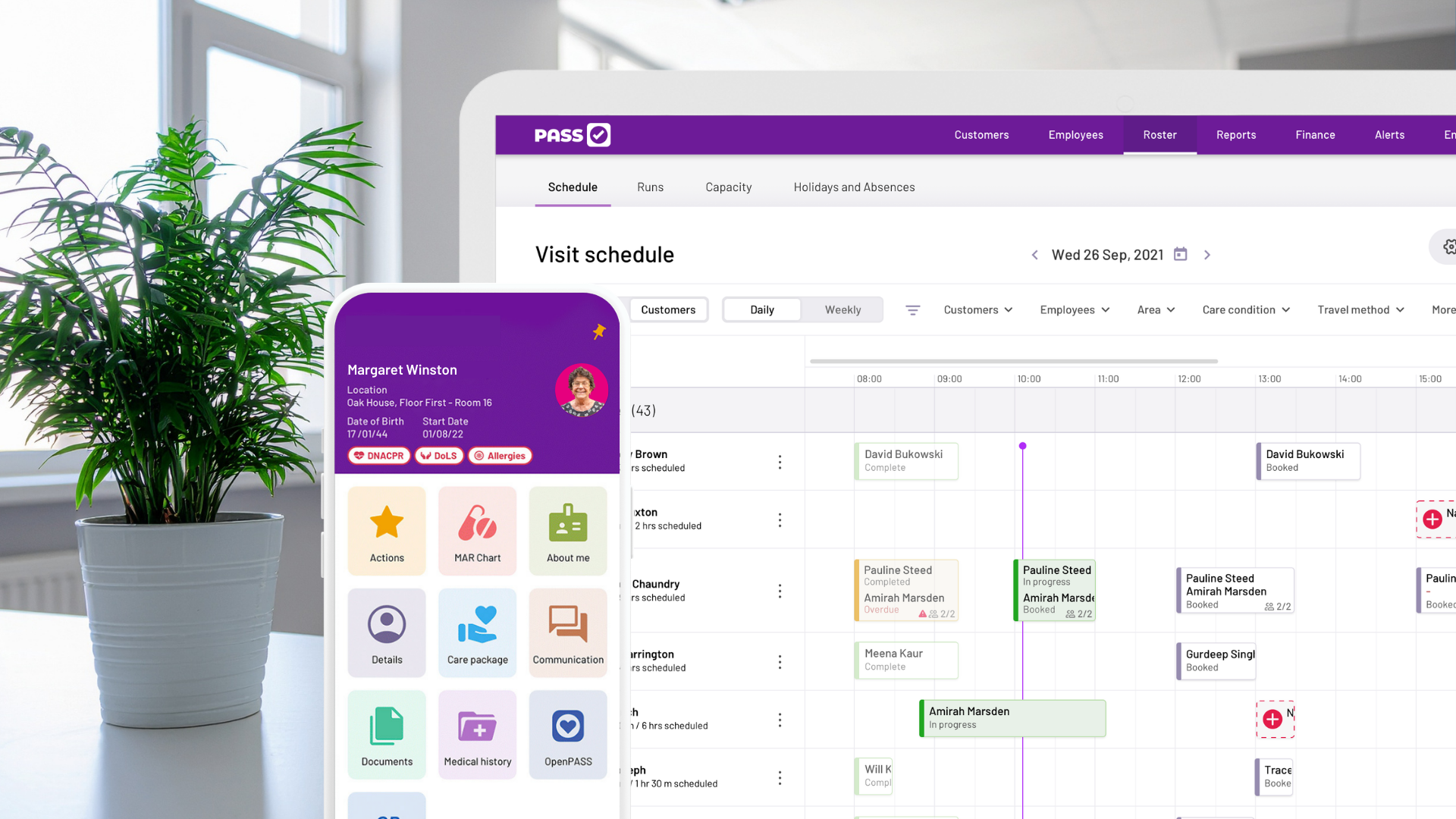
One system across desktop and mobile: schedules, care plans and finance together
AI optimisation
AI-optimised care scheduling software can make your rosters much more efficient, saving your care service time and money – and reducing the risk of late visits for your clients.
AI-powered scheduling solutions can help optimise a carer’s working day, showing how much time is being used for travel, rather than delivering care – allowing care co-ordinators to make changes and ensure that travel time is kept to a minimum. This is great for both carers and clients: carers avoid spending too long driving between homes, and clients are less likely to deal with late or missed calls.
Your AI software might also help you spot upcoming scheduling issues – do you have gaps in the roster, or too many under-utilised staff members?
AI in home care software can help you with other tasks, too, including:
- Summarising care notes
- Alerting you to overdue tasks or late care visits
- Generating invoices automatically
- Creating reports quickly
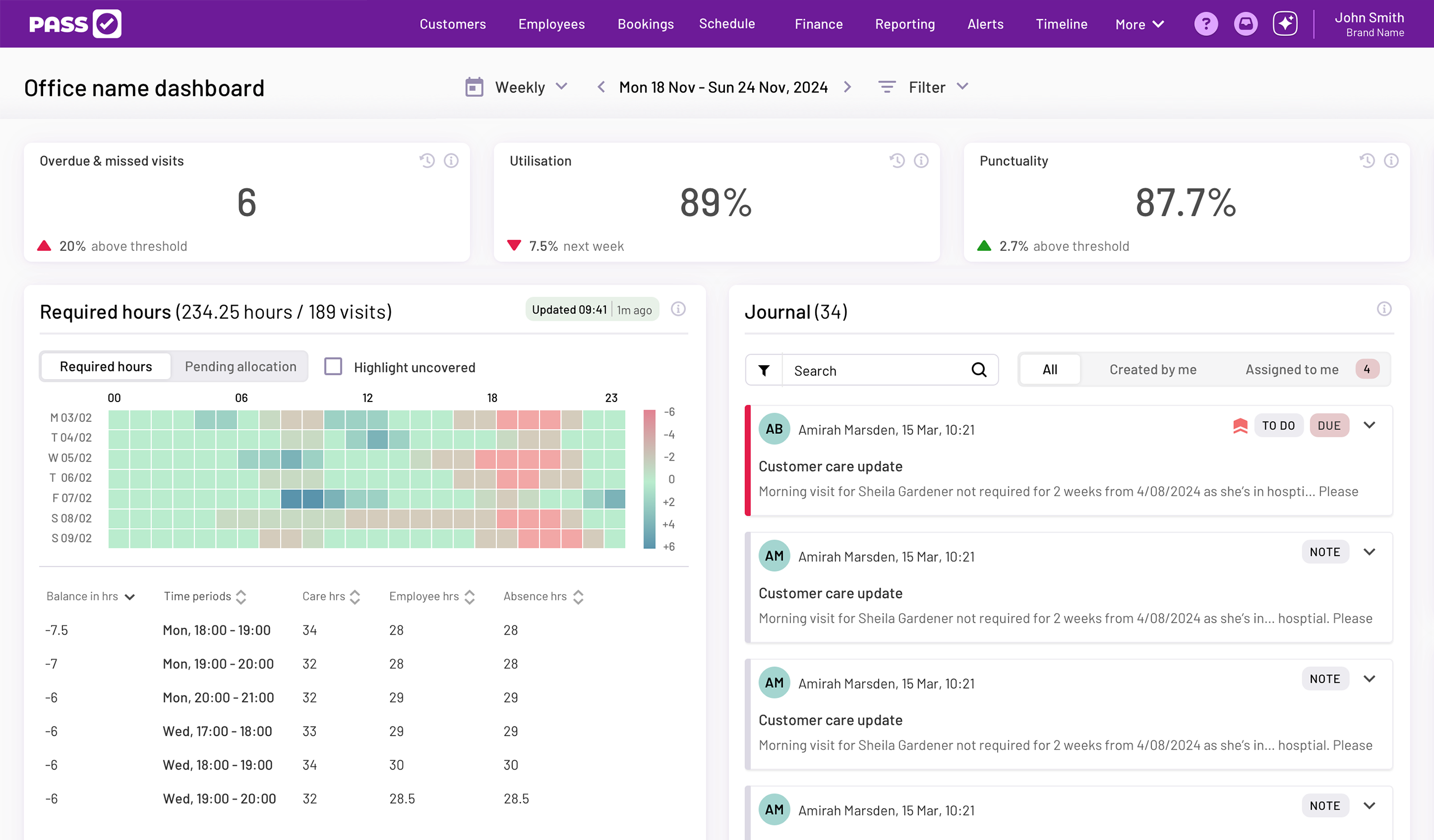
A capacity heatmap shows where your roster has gaps or under-used hours
Invoicing and finance features
Care scheduling solutions should sync with your invoicing and payroll systems.
Whether you choose all-in-one home care management software or decide to look for care scheduling software separately, you should make sure that your chosen software works with your invoicing and payroll systems, or has finance features included.
After all, scheduling and payments are closely linked – and if your care management software takes care of both, you can be confident that you’re invoicing clients for every care visit and paying staff for every shift worked.
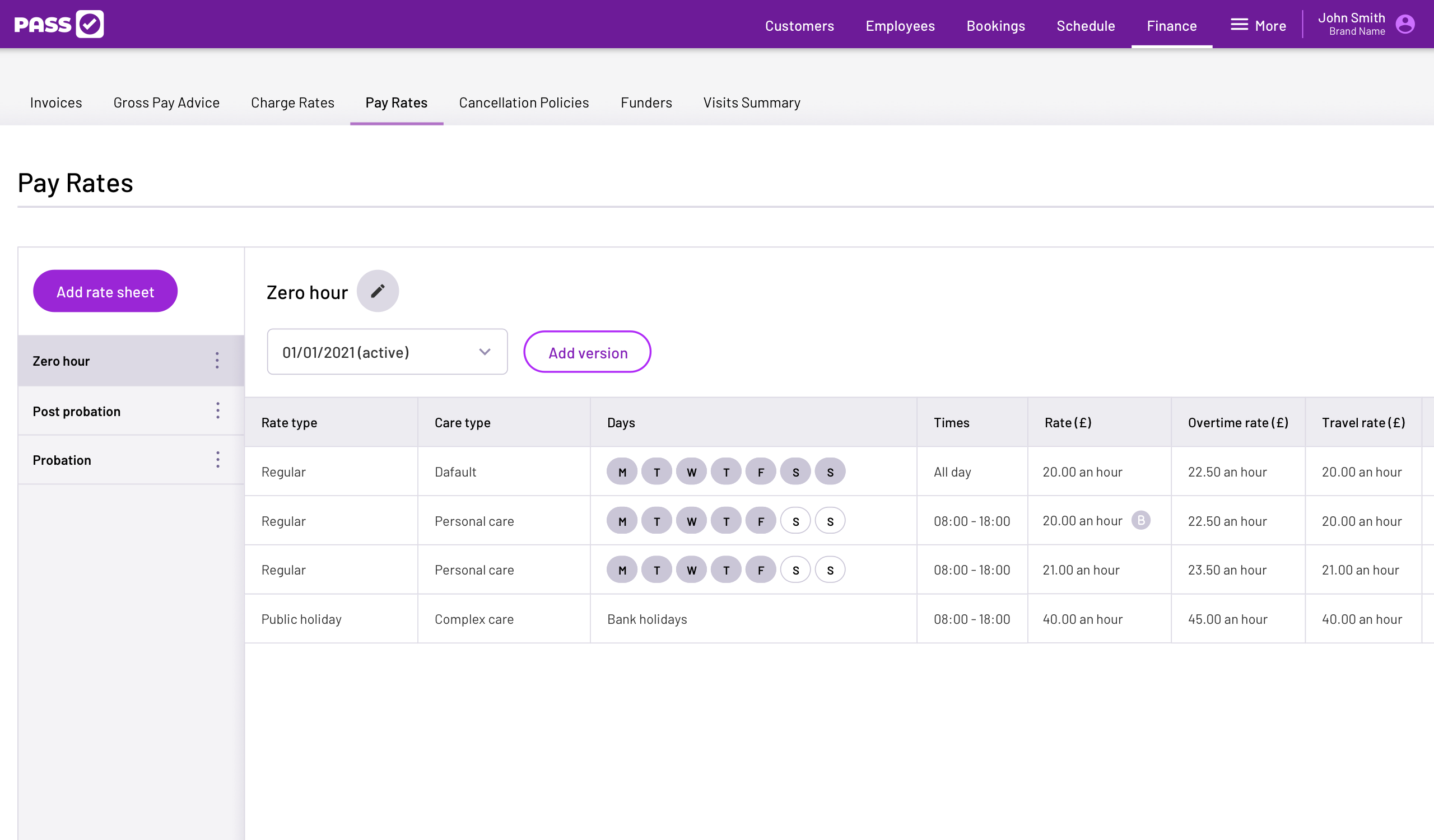
Pay rates sit alongside the schedule, so payroll and invoicing stay in step with every shift
Real-time updates and monitoring
Good scheduling software lets you monitor whether care visits are being completed.
Your home care clients rely on your team – so it’s important to make sure that each care call takes place on time. Care scheduling software should include electronic call monitoring, so you can track and monitor your team’s care visits in real time.
If a team member is late or leaves early, you can take action immediately to ensure your clients receive consistent, high-quality care.
Comprehensive training
Using new software can be daunting, so you need to make sure that your team have the training they need.
Your team might have varying levels of technological literacy, and some members might need some extra support as they get used to the new scheduling software. Look for digital solutions that provide comprehensive training as part of the onboarding process.
Offline access
Your team may need to access care scheduling software when they don’t have internet access.
Your office staff might have consistent access to the internet, but home care teams may struggle to find a signal when they travel to clients’ homes. Even if they can’t access the internet, they still need to be able to see their schedule, clients’ care plans, and medication schedules – and they also need to be able to document care in real-time.
You need to make sure that your chosen care scheduling software still works, even if your team can’t get online – look for digital solutions that support offline working.
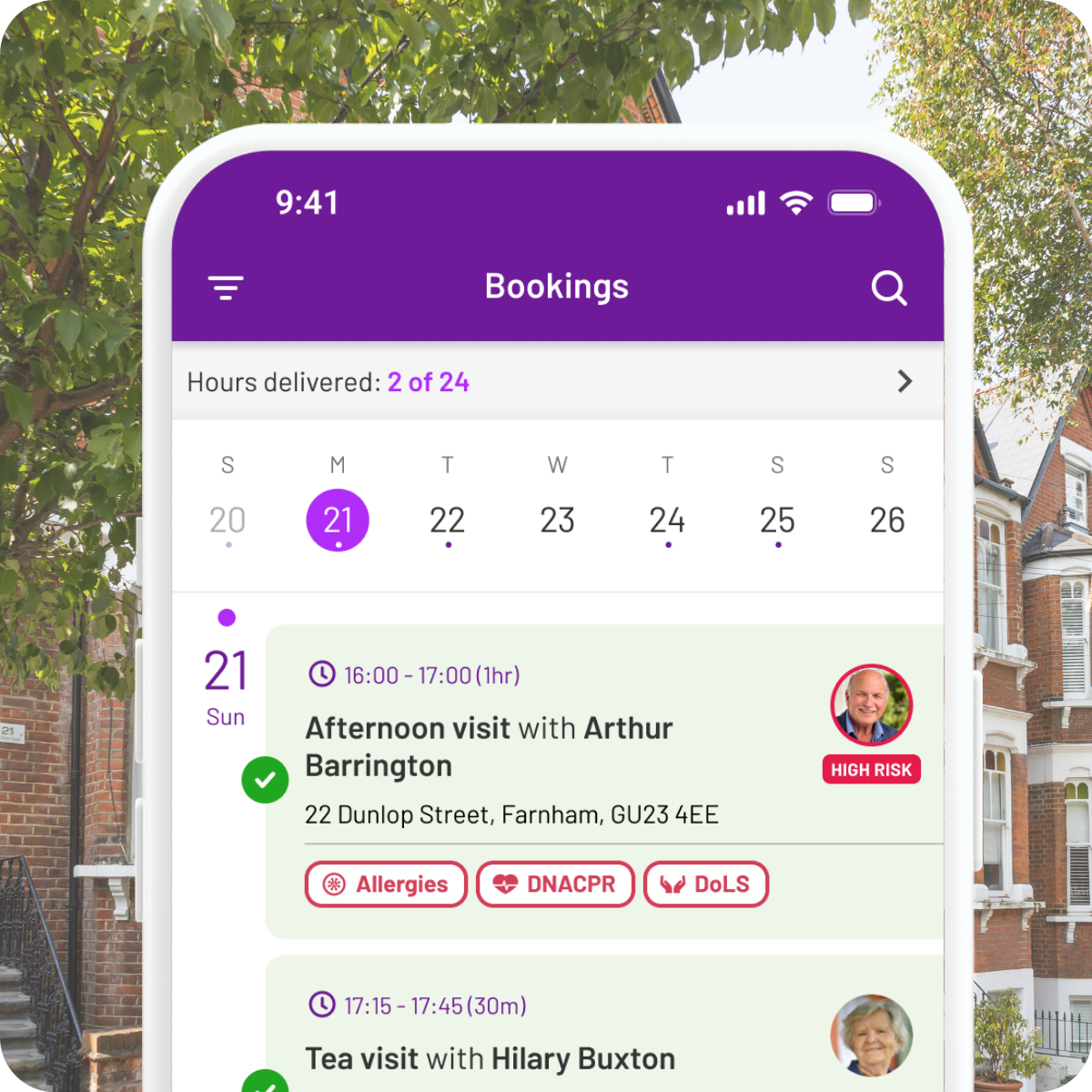
Carers see their visits, care plans and alerts on the app – wherever the day takes them
Remember: Even if your teams usually have great connectivity, internet outages do happen. Offline access should be a priority for all care software.
Great customer support
Care isn’t just a 9-5 job – so you need support on hand throughout the day and night.
If something goes wrong with your care software overnight, at a weekend, or on a Bank Holiday, you need to know that there’s someone there who can help. Make sure you look for a care scheduling solution that provides customer support outside of business hours.
Top home care scheduling solutions in 2026
There are lots of home care scheduling solutions out there, and it can feel overwhelming when you’re trying to decide which is best for your service.
Care software is meant to simplify your life, not make it more complicated – so, to help you, we’ve compared some of the top home care scheduling solutions. Now you can see which is right for your team.
1. PASS by everyLIFE
PASS by everyLIFE is our top home care scheduling solution.
PASS lets you manually create care schedules, with a simple drag-and-drop interface. But, more than that, it uses AI to help you optimise your rosters; PASSgenius™ looks at your data to spot any upcoming capacity shortfalls, as well as letting you know how much time is being spent on travel. With this information, you can make changes to your schedules, so that your carers can avoid unnecessary travel time and spend more time actually supporting clients.
It also automatically generates timesheets and invoices, saving your team time and ensuring everything is accurate.
PASS is a complete all-in-one digital care management system, including care scheduling, care planning, finance features, visit tracking, and medication management. It includes an offline mode, so you don’t need to worry about your team struggling to access the system, and customer service is available outside of business hours when necessary.
The team at PASS offer assistance and training for care services, too, so you can be confident that your staff will understand how to use your new home care scheduling software.
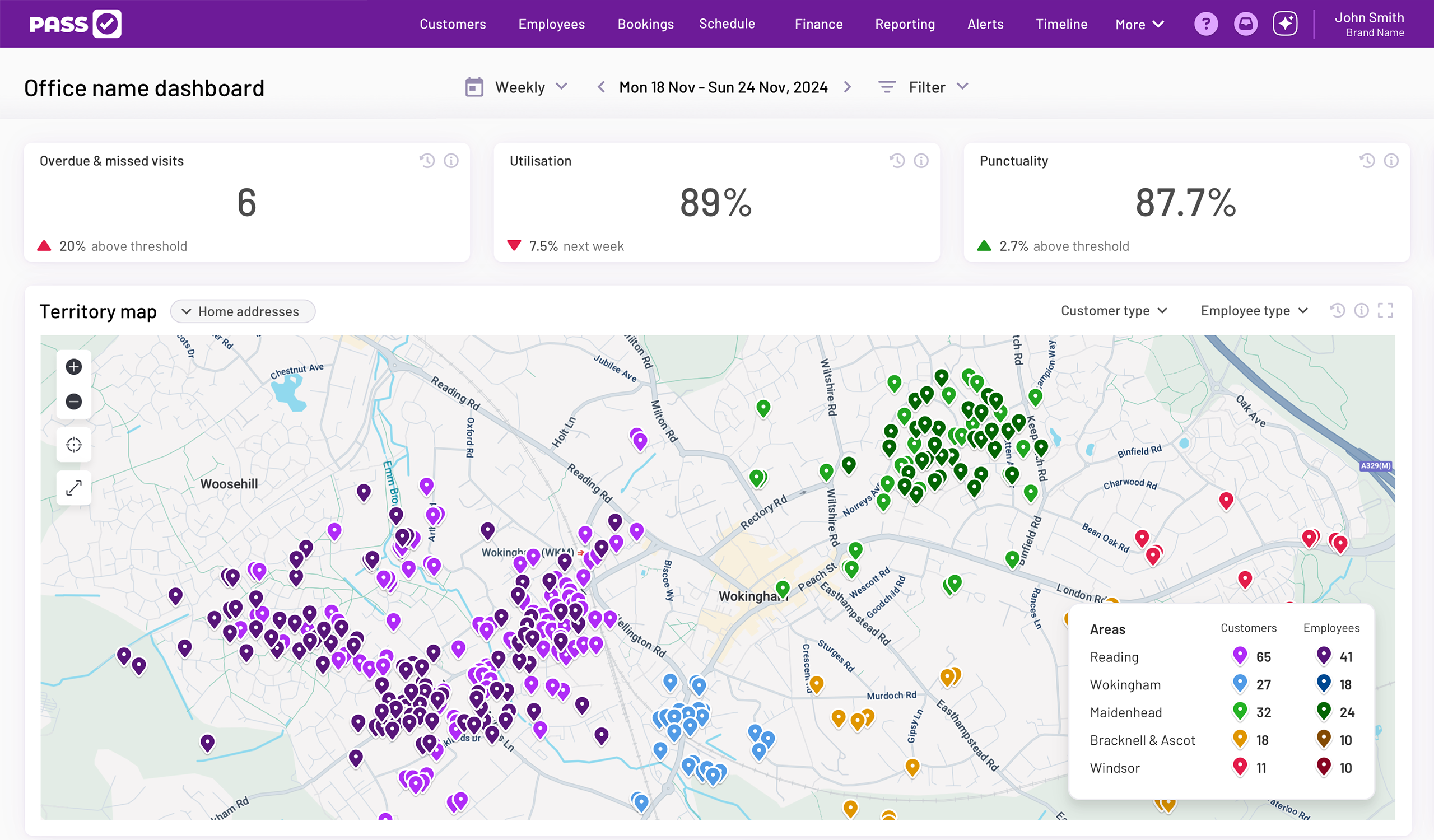
The territory map shows every client and carer across your patch, colour-coded by team
At a glance:
- An all-in-one solution, including care planning, finance features, medication management, and care visit tracking
- Uses AI to help you optimise your care scheduling
- 24/7 customer service available
- Includes offline mode
- Comprehensive training included as part of the onboarding process
2. ShiftCare
ShiftCare is another all-in-one software solution, which lets you manage rostering, care planning, and reporting, as well as payroll and invoicing. Conveniently, it can link with other external services, too, like Quickbooks or Xero accounting software, and Google calendars.
It offers a few different pricing plans, depending on your organisation’s needs – although only the most expensive tier has access to 24/7 customer support.
At a glance:
- An all-in-one solution, handling rostering, care planning, and finance
- Links with external services
- Uses GPS to track care teams
3. Nourish
Nourish can support you with care scheduling, as well as providing invoicing, payroll and care planning services. It shows travel time between visits, and suggests the right carers for visits. Carers are tracked by GPS, so your office team can monitor and verify that calls have taken place.
At a glance:
- An all-in-one solution – although you might need several apps to get the complete functionality
- Carers tracked by GPS
- Offline access available
4. OneTouch
OneTouch is another all-in-one care management solution, with care planning, medication management, invoicing, and payroll features all included, as well as scheduling. It lets you assign tags to your team members, so you can make sure that clients are getting the best carer for each visit. However, there’s no offline mode available.
At a glance:
- All-in-one solution that links with care plans, invoicing, and medication management
- Needs internet access
5. CareLineLive
CareLineLive is an all-in-one solution that lets you track care visits, invoice clients, and prepare care plans. When it comes to scheduling, it uses Google Maps to help you check travel time, and lets you add in unplanned care visits where necessary.
At a glance:
- All-in-one care software that includes finance features and care visit tracking
- Uses Google Maps to estimate travel time
6. Access
Access Care Rostering includes invoice and payroll features, as well as care scheduling. However, if you want additional features like care planning, you’ll need to use additional Access apps – this isn’t an all-in-one solution.
At a glance:
- Includes scheduling, invoice, payroll and employee management tools
- Can link with other Access tools, but isn’t an all-in-one solution
Five questions to ask before investing in home care scheduling software
Now that we’ve looked at some of the top home care scheduling software, and explained why it could be useful for your care service, it’s time to make sure that you’re choosing the best solution for you.
Ask yourself these questions about your chosen home care scheduling software:
- Does it meet our organisation’s needs? Consider whether your chosen software is right for your organisation – now and in the future. If your care service grows, will it able to handle a larger client base or more users? Remember, some care scheduling software is more focused on residential care – make sure that your chosen solution can handle the unique challenges of travelling and providing domiciliary support.
- Will this software be accessible for our care team? Ask yourself whether your care co-ordinator will be able to use the software, and if your care workers can access it. Make sure that you have compatible smartphones or tablets for each team member.
- How will we handle the setup process? Find out if the software company will provide support during setup – importing all of your client and staff data could be time-consuming. Will they provide training, and if so, is this an extra cost?
- How much will this solution cost us? Make sure that you understand the full cost of your chosen software. Are there any hidden fees or extra setup costs? Ask for a full breakdown of all charges – including any penalty fees if you need to break your contract early.
- How do other organisations feel about this software? Look for reviews or testimonials from other home care services, or ask to speak to some of their other clients. If a developer doesn’t have good reviews from reputable care organisations, this could be a red flag.
You should also make sure that you’re following the Digitising Social Care advice on choosing the right solution for your organisation.
The next steps
Now you know what to look for in home care scheduling solutions, it’s time to find the software that works for you.
If you’re ready to simplify your care service’s scheduling, the team at PASS are ready to help!
Book a free tour
Ready to simplify your scheduling?
See how PASS helps you plan rotas, track visits in real time, and keep invoicing in step with every shift.
👉 Get started with PASS